Assistive Technology and Dyslexia
Dyslexia

What is Dyslexia?
Dyslexia is a specific learning disability in reading. Kids with dyslexia have trouble reading accurately and fluently. They may also have trouble with reading comprehension, spelling and and writing. (Understood Team)
|
|
Here, a reading expert Margie Gills goes into what dyslexia is and how it can affect students in reading and other subjects relating to this skill
|
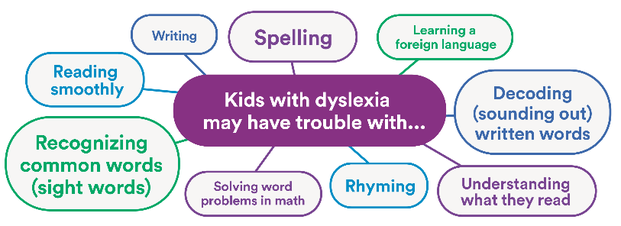
Signs of Dyslexia Through the Ages:
Preschool:
|
Elementary School:
Has trouble with taking the middle sound from a word or blending several sounds to make a word Often cant recognize common sight words Quickly forgets how to spell words Gets tripped up by word problems in math High School: Often skips over small words when reading around Doesn't read at the expected grade level Strongly prefers multiple choice questions over fill-in-the-blanks or short answer |
Dyslexia can also affect how students everyday skills and activities. These include social interaction, memory and dealing with stress
|
|
Here, Anya talks about how she was a student with both dyslexia and ADHD. She talks about her experience and how she was able to be successful through her parents help and her teachers around her. She also touches on how she uses what she had to go through and uses this to help her students now, since she is a special education teacher.
|
Ways to Help Student with Dyslexia:
*Multi-sensory structured literature instruction which engages kids through sight, hearing, movement and touch
*Accommodations help kids learn and show what they know, like doing an oral report instead of a written assignment
*Assistive technology tools, like audio books and text-to-speech apps, can help level the playing field for struggling readers
*Multi-sensory structured literature instruction which engages kids through sight, hearing, movement and touch
*Accommodations help kids learn and show what they know, like doing an oral report instead of a written assignment
*Assistive technology tools, like audio books and text-to-speech apps, can help level the playing field for struggling readers
Assistive Technology
What is Assistive Technology?
Assistive technology is any device, piece of equipment or system that helps a person with a disability work around his or her challenges so they can learn, communicate or simply function better. (Understood Team)
|
|
This video gives a synopsis about what assistive technology is and how it can help many different students with all different kinds of situations like in the classroom, at home and in the environment all around them
|
Assistive technology is used by individuals with disabilities to make accomplishing day to day tasks easier. Examples of AT could include wheelchairs, eyeglasses, eyeglasses, braille printers, and alternative conversation devices
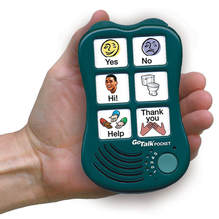
Alternative Conversation Device
|
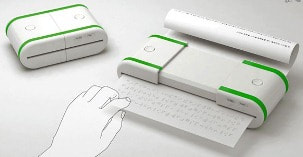
Braille Printer
|
Assistive Technology for Students with Dyslexia
For individuals that have dyslexia, assistive technology allows for tools that allow for reading and writing to be easier. It is usually done in computer alternative systems and software.
The categories that the tools for dyslexia are put into are---comprehensive technology options; planning, time management and organization; text to speech; speech to text; audio recorders; timers and metronomes; kinesthetic desks, chairs and tools; white noise/noise cancelling; calculators and step by step math instruction; note taking; graphic organizers; writing assistance; word prediction, spell checks, and grammar checks; OCR/scanners and language learning
Descriptors for types of AT for dyslexic individuals
Comprehensive technology options: Comprehensive technologies offer multiple assistive technologies tools in one. Typically providing support for reading and writing.
Planning, time management and organization: Helping learners with planning, time management, and organization. Today, apps can make phones and other handheld devices almost personal assistants. Homework assignments can be recorded, to-do lists can be created, reminders set, assignments broken down into manageable steps and more.
Text to speech: With text-to-speech technology, dyslexic students can listen to words while scanning text or visualizing with the narrative. This can be used to improve reading speed, develop visualization skills, and many students report that it helps them see whole words instead of strings of letters.
Speech to text: Speech to text software takes the spoken word and translates it into text. Individuals with dyslexia can speak into a built-in or external microphone and their words appear on the screen. Spelling is no longer a barrier to writing, however, users have to learn to speak their punctuation by saying "comma" or "new paragraph" as needed.
Audio recorders: If writing or taking notes is difficult an audio recorder can record class content, so information can be reviewed at a later time. This enables individuals with dyslexia to focus on the content instead of writing and spelling. Whether you're in a lecture, interview, or conference, learners can be fully present.
Timers and metronomes: For students with dyslexia who struggle with attention and stamina, timers and metronomes can make a difference. On the one hand, timers, can help focus the student effort and provide motivation over an allocated period of time. On the other hand, metronomes make repeated sounds at adjustable intervals to create a pace or rhythm for learning.
Kinesthetic desks, chairs and tools: For dyslexic students with attention issues or who may fidget and fiddle in the classroom, there are "kinesthetic" desks and other furniture that allow movement or feature movable parts like swiveling platforms, ellipticals, and bike pedals. These tools increase heart rate, improve circulation and, in turn, stamina and mental function.
White noise/noise canceling: Research shows that frequency modulation systems, white noise and some types of music can help some struggling learners study by blocking unexpected noise thus enhancing attention.
Calculators and step by step math: Some students with dyslexia can struggle with rote learning reversing symbols such as the greater and lesser sign, word problems, handouts that are visually dense and multi step problems.
Note-taking: Note-Taking is a deceptively complex task. Having to simultaneously listen, process and write can overwhelm some students. What to do? Luckily there are helpful apps and devices for making this essential task easier.
Graphic organizers: A graphic organizer, also known as concept map, story map, cognitive organizer, or concept diagram is a tool that uses visual symbols and sequenced text boxes to express knowledge, concepts, thoughts or ideas, and the relationships between them. In particular, graphic organizers can help students with dyslexia to organize and plan out large assignments, stories, essays, lab reports, timelines and more.
Writing assistance: There are a number of programs that can help students with dyslexia to master the overall structure of the writing process.
Word prediction, spell checks, and grammar checks: Students with dyslexia often struggle with spelling, word finding, and writing. For these learners, word prediction, spelling and grammar software/apps can help them focus on the content of their writing rather than the mechanics.
OCR/Scanners for text-to-speech: Optical Character Recognition along with scanners are great at transferring text from physical sources onto a a digital document. There are various types of OCR programs and apps available for desktop and mobile.
Language learning: Although many students with dyslexia qualify for a foreign language substitution or exemption, for those who can choose to learn a second language, there are a number of products on the market that can help with the learning progress.
Some Examples of Specific Types of Devices or Applications for Dyslexic Individuals*
In the Classroom•Raz-kids: this website provides comprehensive reading for kids that reads to the students. Students can also read themselves at their own pace if they so choose
•Read and Write for Google Chrome: This speech to text dictation allows for kids to say what they want to write, along with highlighting text while reading aloud so students can follow along •iStudies Pro: This Apple App helps students track school assignments, manage projects, save notes, organize tasks and create complicated schedules •Reading Guides and Color Overlays: If students with dyslexia are experiencing visual stress, whether it be overwhelmed by a page of text, struggle with visual tracking, having difficulty maintaining attention while reading or dislike the contrast of black letters on white paper. |
At Home•Strict Workflow: This free Chrome extension enforces 25 minutes of distraction free work followed by a five minute work break
•Zenergy Ball Chair: This bouncy, wiggly, yet stable chairs, provide a core strengthening, comfortable position •Endless Numbers: This Apple app helps young students learn number recognition, sequences, numerical patterns, quantity and simple addition with adorable monsters. Numbers come alive and short animations offer context and meaning. •Smartpen: This pen and audio recorder records speech and text simultaneously. Recorded text can be made digital, and recorded audio can be mapped to the text allowing a student to re-listen to a specific part of a lecture. |
In Social Settings• iOS Accessibility: Apple offers a wide range of assistive technology that could benefit individuals with dyslexia including voice over, guided access and assistive touch
•Google Translate: This free online language translation services instantly translates text and web pages |
*Note that these are just a few of the supports that can be used, there are plenty more that aren't listed and are just as useful
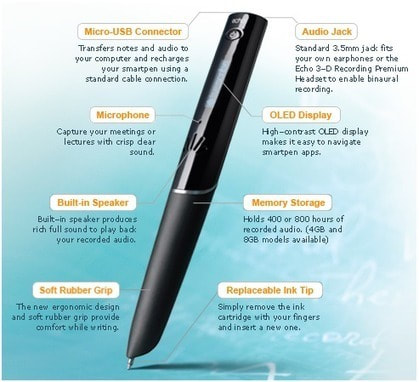
A Smartpen
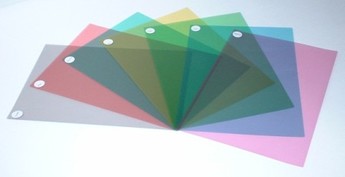
Colored overlays
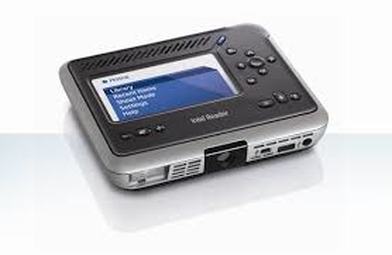
Book reader
Sources
https://www.understood.org/en/learning-attention-issues/child-learning-disabilities/dyslexia/understanding-dyslexia
https://www.understood.org/en/learning-attention-issues/child-learning-disabilities/dyslexia/dyslexia-fact-sheet
https://www.understood.org/en/school-learning/assistive-technology/assistive-technologies-basics/assistive-technology-what-it-is-and-how-it-works
https://www.dyslexiamaterials.com/assistive-technology-for-dyslexia.html
https://www.lexercise.com/blog/assistive-technology-dyslexia
https://www.understood.org/en/learning-attention-issues/child-learning-disabilities/dyslexia/dyslexia-fact-sheet
https://www.understood.org/en/school-learning/assistive-technology/assistive-technologies-basics/assistive-technology-what-it-is-and-how-it-works
https://www.dyslexiamaterials.com/assistive-technology-for-dyslexia.html
https://www.lexercise.com/blog/assistive-technology-dyslexia